
Updating Quasar
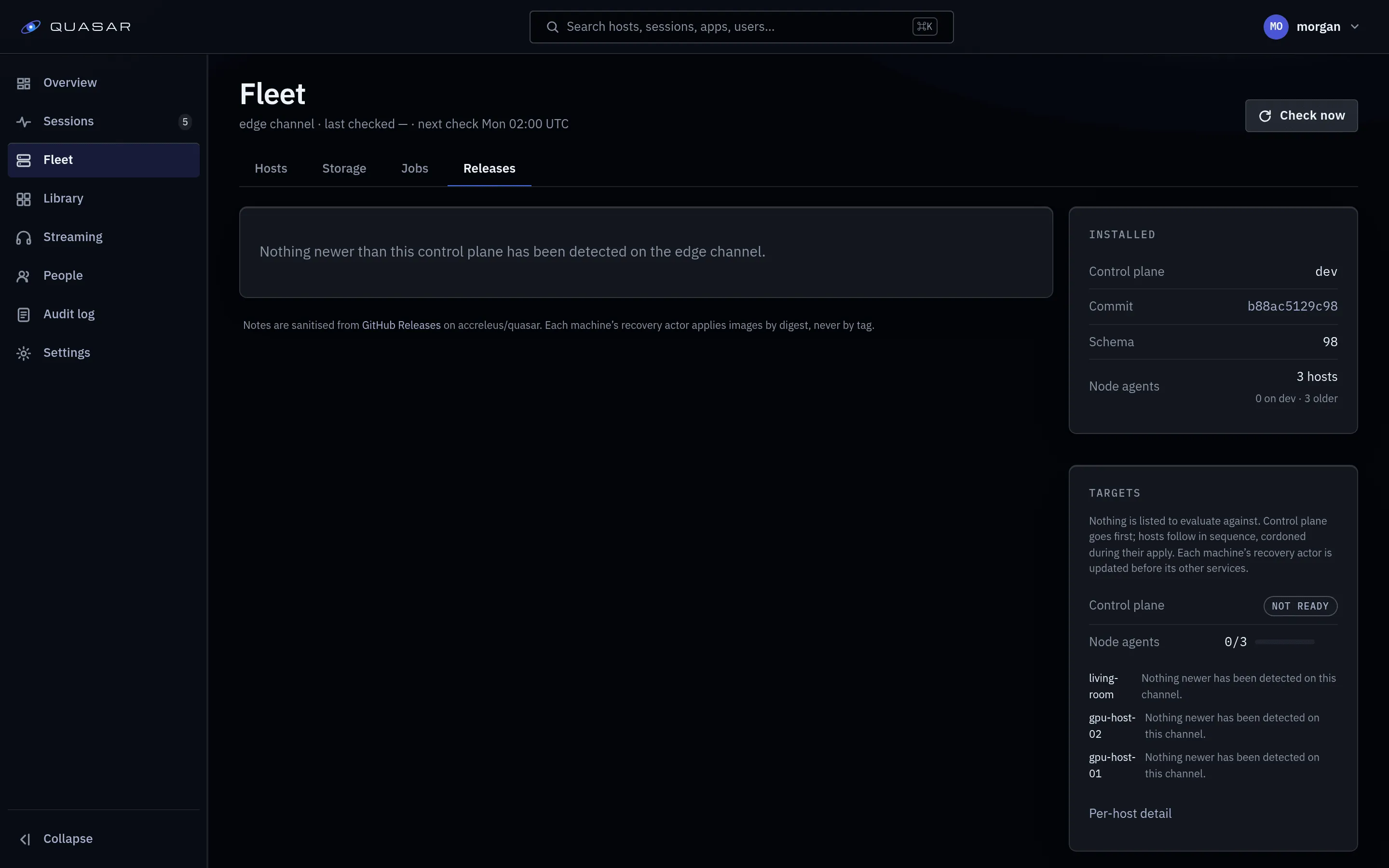
A platform release is a matched set of Quasar’s own images (control plane with the web app, node agent, recovery actor) built from one commit. The seed and Postgres are not part of it. Admin ▸ Fleet ▸ Releases shows what you run, what exists, and which machines can take it.
Each release has a floor: the oldest node agent and recovery actor it still manages. A host below it reads Must update before it can be managed and is offered only the update, never a revert.
App catalog images are separate: see Images.
When a newer release is listed, a banner (Quasar X.Y.Z is available) appears across the admin area. Dismissing it lasts for the browser session.
Installed
Section titled “Installed”What this instance reports it is running:
- Control plane: version, commit, database schema version, build time.
- Node agents: host count, and how many have not reported an identity.
- This machine (combined or control-only install): Seed, Recovery actor, Database, Control plane and, on a combined host, Node agent, each with its version. If the recovery actor does not answer, it shows for how long and its last report.
Branch and source builds report dev. Older agents may show 0.1.0; identify
those by commit and build time. Per-host detail is in the host
drawer.
Channels
Section titled “Channels”| Channel | Lists |
|---|---|
stable |
Tagged releases with notes. The default. |
beta |
Tagged releases plus prereleases (release candidates). |
edge |
The latest build from one branch. No version, no notes. |
- A prerelease can carry a migration the next one revises, and migrations only go
forward. Use
betaonly where being ahead of stable is acceptable. - Switching back to stable never rolls you back. No channel offers a build
older than the installed one. On
0.3.0-rc.1, stable lists nothing until0.3.0ships. edgefollows the branch in the Edge branch field. The field is kept when you switch channels.
Moving an edge install to stable
Section titled “Moving an edge install to stable”Installs made before the first stable release started on edge and stay there.
Set the channel to stable and press Check now. Nothing is reinstalled; stable
may list nothing until the next stable release is newer than your build.
Switching channel changes what is listed, never what is installed, and does not start a check.
An edge build older than the installed build (same schema version, older build time) is listed as Older than installed and cannot be applied.
Available, and the notes
Section titled “Available, and the notes”Each entry shows its name (version, or short commit on edge), build time, commit and schema version. Stable releases show their notes; edge builds link to a comparison with the installed build.
Nothing below the control plane’s schema version is ever listed (the one-way migration rule).
Check now
Section titled “Check now”Runs release detection immediately: the same as Run now on the detection job. It never applies anything. The subtitle above the tabs shows when the last check ran.
Targets
Section titled “Targets”The Targets table lists the control plane and every host against the newest listed release, as Ready or Not ready with a reason.
| Reason | Meaning |
|---|---|
| Already on the newest release. | Nothing to do. |
| Nothing newer has been detected on this channel. | No release on offer. |
| This target has not reported what it is running. | An old agent. Upgrade it once by hand. |
| Built from source on the host: update it with git, not from here. | Source install. Use the manual recipe. |
| No recovery actor answers on this machine: it was not installed with the seed, or its actor is down. | Legacy Compose install, or the recovery actor is stopped. |
| Must update before it can be managed. | Below the control plane’s floor. Only the update is offered. |
| A preflight check failed on this target; the check below names the fix. | See the checks. |
| The host’s agent is not connected. | Offline. Skipped, not failed. |
| Waiting on the control plane: this release carries a newer schema. | Agents never move past the control plane. |
| Waiting on the control plane, which moves first. | Same rule, during a fleet update. |
| An update is already in flight on this target. | One at a time per target. |
| A fleet update is already running. | Wait for it, or cancel it. |
Preflight checks: recovery actor reachable, no other owner’s container in the way, images resolve at the registry, room for the pre-update dump (if the release migrates), and on a host, agent connected and health port free. A failing check marks the target Blocked and names the fix. A check that cannot be evaluated only warns.
An agent newer than the control plane shows under Needs attention as Agent ahead of the control plane. It only happens after a manual downgrade.
The manual recipe
Section titled “The manual recipe”Each not-ready target gets a block under the table with its current and possible version and the commands for its case (source redeploy, finding a silent recovery actor, or the legacy Compose recipe). Offline hosts get none. The commands match the Upgrading page and contain nothing specific to your environment.
Apply to one host
Section titled “Apply to one host”A ready host offers Apply:
-
The host is cordoned, as in draining.
-
It waits for the host’s sessions to end. The checkbox Update now — ends every live session on this host skips the wait.
-
The recovery actor replaces the agent. It pulls the release, keeps the old agent stopped, starts the new one and waits for it to be healthy. If the release also updates the recovery actor, that goes first. The first failure stops the rest.
-
The new agent registers on the release’s commit, which marks success.
-
The cordon is restored to what it was before, success or not.
If the apply fails:
- A failed pull changes nothing; the old agent keeps running.
- If the new agent never becomes healthy, the old one is restored automatically. History shows Reverted automatically with the failed container’s last log lines.
- If that restore also fails, the failure panel gives the commands to fix the host by hand.
An update interrupted by a restart (recovery actor, engine or machine) is finished
when the recovery actor next starts. If the old agent was not touched yet, it ends
as failed (interrupted) with nothing changed. Interrupted updates are never
retried automatically.
Update Quasar
Section titled “Update Quasar”Update Quasar updates the whole instance: the control plane first, then each eligible host, one at a time. There is no hosts-only option.
- If the control plane needs updating, every host is cordoned for the whole run. Otherwise each host is cordoned only when its turn comes. Cordons are restored at the end.
- A release with no migration does not wait for sessions. They stream through the control-plane restart.
- A release with a migration drains the whole instance first. The checkbox ends sessions immediately instead.
The confirmation says which case applies.
During the control-plane step the API and console are briefly down.
- No migration: a new control plane that never becomes healthy is rolled back automatically.
- With a migration: Quasar dumps its own database first (on your own database, you
must tick the backup checkbox). A failed migrating update is not rolled back
automatically; it ends with the
restorecommand to run (see Restoring).
Hosts then follow in fleet order, each exactly like a single Apply.
- The run stops at the first failed target. Earlier targets stay updated.
- Hosts that cannot take the release (offline, source-built, below the floor, no recovery actor) are skipped, not failed. “Nothing was eligible” is a valid result.
- Cancel stops the run before the next target. A step already in progress finishes.
“Quasar was updated”
Section titled ““Quasar was updated””An open admin tab shows that the control plane is restarting, then a toast: Quasar was updated, This page is running the previous build. Press Reload.
Revert a host
Section titled “Revert a host”After one successful update, a host row offers Revert. It works like Apply (same drain and confirmation) but targets the images recorded as previous on that host’s last successful update. It is not a version picker. Reverts are recorded, so they can be reverted too. It never goes below the control plane’s floor.
Developer apply
Section titled “Developer apply”The Developer apply card applies image digests from an allowed registry namespace (for example a branch build) to one Quasar-owned host. Admin-only, never automatic. See Developer apply.
Install updates automatically
Section titled “Install updates automatically”Off by default. Turn on in Admin ▸ Settings ▸ Platform updates ▸ Install updates automatically. Quasar then runs Update Quasar itself when it detects a release.
- Releases that change the database are never installed automatically. They wait for you.
- The schedule is the detection job’s. Move the job to move the update window.
- It always waits for sessions to end on each host.
- A failed release is not retried. A newer release still installs; applying the failed one yourself clears the block. A cancelled run is tried again next pass.
The detection job’s latest run summary shows auto_apply: started with the run
id, or why not (carries_migration, no_release, not_eligible, in_flight,
failed_before). Automatic runs are marked on this page.
Release notifications
Section titled “Release notifications”Notifications posts one message to a webhook when detection finds a release this instance can move to. Slack, Discord and ntfy accept it as is.
- Paste the webhook URL into Webhook URL and save.
- Press Send test (works whether or not notifications are on).
- Press Turn notifications on.
- Treat the URL as a secret. Quasar never logs it.
- Delivery is
httpsto public addresses only. For a LAN receiver, put a public endpoint (such as a tunnel) in front. - Each release is announced once. Failed deliveries are retried for a few passes, then dropped.
To sign deliveries, set Admin ▸ Settings ▸ Secrets ▸ Release notification
signing secret. Each delivery then carries an HMAC-SHA256 signature over its
timestamp and body; the header format is in the repository’s docs/upgrading.md.
History and the audit log
Section titled “History and the audit log”Apply history lists every update and revert, newest first, with target, outcome and the digests replaced. Revert depends on those digests: see Backup and restore.
The audit log records each action and its admin:
platform.apply.host, platform.apply.run, platform.apply.cancel,
platform.revert.host.
See also
Section titled “See also”- Upgrading: the migration rule, release signatures and developer apply.
- Legacy Compose installs: updating a Compose stack by hand.
- Jobs and schedules: the detection job’s schedule.
- Environment variables: the settings behind this page.