
Hosts and GPUs
Admin, Fleet, Hosts lists every machine running a node agent, with its GPUs.
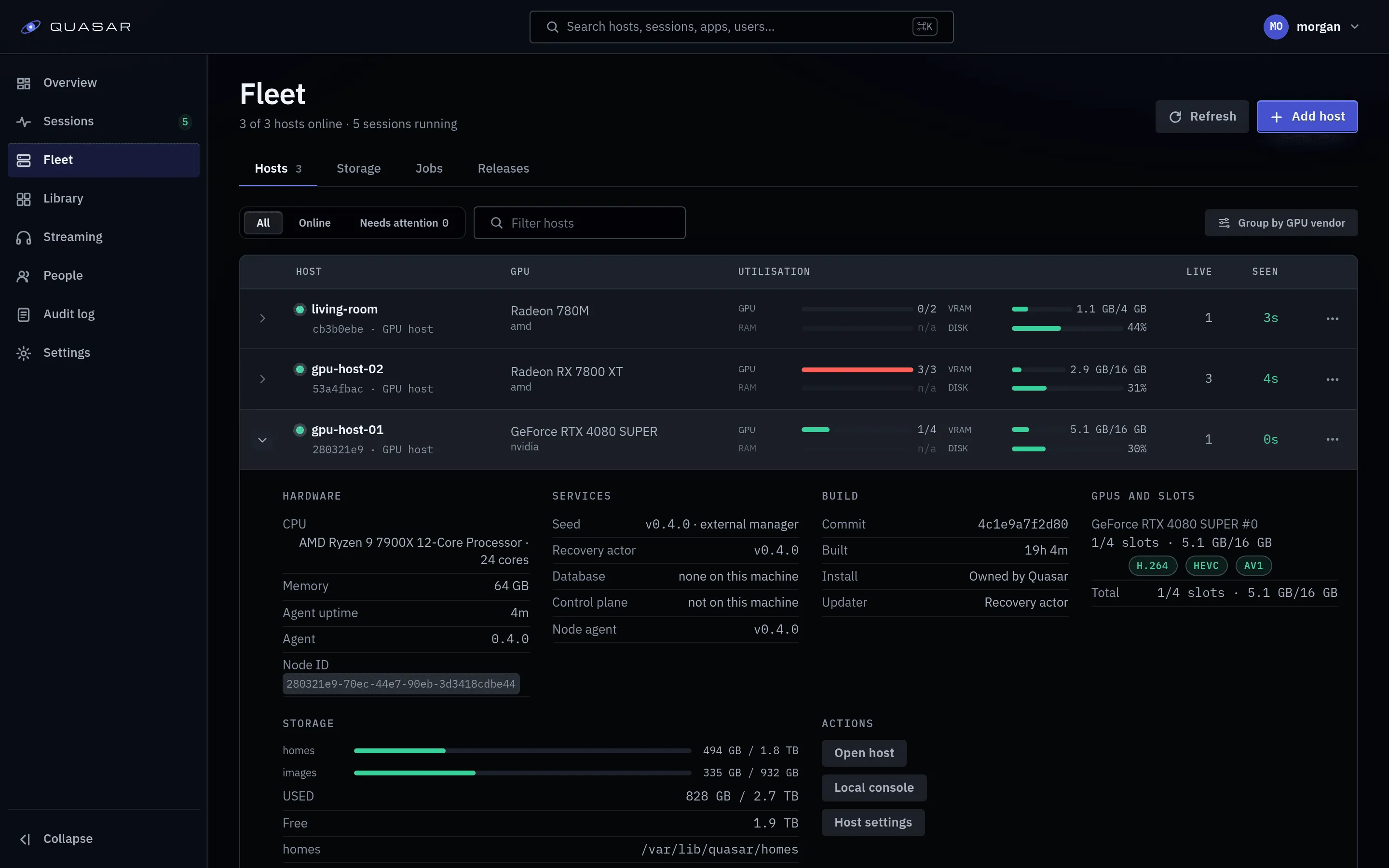
Reading a host
Section titled “Reading a host”Each host shows its status, last heartbeat, CPU, storage and readiness checks. Readiness reports what the agent actually found, not what the configuration claims. Each check and its fix is on Readiness checks.
Two checks behave differently:
xid_visibilityreads skipped unless the host lets Quasar read the kernel log (optional). When allowed, GPU faults appear in the session trace; otherwise read the host’sdmesg.media_reachabilitystays unknown until a browser on another machine tries a session. If that connection never arrives, it fails and names the firewall rule to add (Ports and endpoints).
A known AV1 driver restriction leaves the host usable with its other codecs; see AV1 driver compatibility.
When a check blocks launches
Section titled “When a check blocks launches”A host always registers, however many checks fail. Most checks are advice. A check blocks launches only when it rests on real evidence (a probe of the real path, or something like an unwritable home root) and currently fails. Configuration-only checks, warnings and inconclusive probes never block.
| Scope | What it blocks |
|---|---|
| Host | Every launch on the host. |
| Homes | Every launch on the host that mounts a managed home. |
| GPU | Every launch placed on that GPU. Other GPUs keep serving. |
Only a report from the last minute counts. When readiness is the only reason no
host can take a launch, the player sees host_not_ready; the check itself is named
only on the host’s readiness card. Game swaps in a running session are not affected.
Overriding a failing check
Section titled “Overriding a failing check”Launch anyway on a blocking check lets the host launch despite it. The check stays on the card, marked overridden. An override:
- applies to that check on that host only;
- ends by itself the next time the check passes;
- is written to the audit log with who set it;
- is refused for checks the agent enforces itself.
Withdraw override removes it. An override for a check the agent no longer reports is listed as inert.
Build identity in the host drawer
Section titled “Build identity in the host drawer”Expanding a host row shows a Build block, as the agent reported it.
| Row | What it says |
|---|---|
| Commit | The commit the agent was built from. |
| Built | When that build was made. |
| Install | Owned by Quasar (managed by its recovery actor), Registry (published images on a legacy Compose stack) or Built from source. A source-built host is never given a release. |
| Updater | Recovery actor if it answered, Not answering if not (no release can be applied), or None on a host without one. An older Compose host may read Present. |
Unknown means the agent is too old to report. It keeps working but must be upgraded by hand once; the Releases tab shows how.
Services on this machine
Section titled “Services on this machine”An owned host’s page (and its expanded row) lists its services with version and owner:
- Seed: owned by your external manager (Dockge, Arcane or
docker run). Quasar never updates it. Not found means no seed is running: start it again, or a deleted recovery actor can’t be re-created. Unknown means its version couldn’t be read. - Recovery actor and node agent: owned by the recovery actor.
On a combined host the card also lists the database (Quasar’s own or Your own) and the control plane. A control-only machine has no host row; see Admin, Fleet, Releases, Installed, This machine. An offline host shows its last report.
Warnings:
| Warning | What to do |
|---|---|
| No seed found | Start the seed again. |
| Another owner’s container is in the way | A Quasar-looking container this install didn’t create (such as an old Compose stack). Updates are blocked until you remove it and whatever re-creates it. |
| Must update before it can be managed | The agent or recovery actor is below the control plane’s floor. Only the lifting update is offered; see Updating Quasar. |
| Agent ahead of the control plane | Something was rolled back by hand. The control plane must move first; see Updating Quasar. |
A GPU host’s card has Remove host (see Draining and
removing). A combined host is removed with uninstall on
the machine instead (Uninstalling).
GPU capacity and admission
Section titled “GPU capacity and admission”Each GPU shows its encode slots and VRAM. A session is admitted to a GPU when:
- it has a free encode slot, and
- its latest sample shows at least
QUASAR_VRAM_MIN_FREE_MBfree VRAM (default 1024). Missing or implausible telemetry never blocks. Set0to admit on slots alone.
The three launch refusals
Section titled “The three launch refusals”| Refusal | Meaning |
|---|---|
no_host_available |
Nothing online can serve it, usually every host offline. The web client retries for 20 seconds; if it persists, check the hosts. |
capacity_exhausted |
Hosts are up but full. Retry once something ends. |
host_not_ready |
A failing readiness check keeps the host out. Clears when you fix or override the check (details). |
A codec the player explicitly picked that no GPU can encode is refused with one of the first two.
Per-host settings
Section titled “Per-host settings”Each host has a Settings page. Every setting has a source:
| Source | Where the value comes from |
|---|---|
| Deployment setting | The agent’s environment and device detection. The default. |
| Automatic choice | Quasar picks from what the host has proven. Encoder and render node only, when exactly one GPU passed its media probe. |
| Explicit value | A value you type. |
Each setting shows Verified on the current connection once the agent confirms it, or Not yet verified.
Next-session settings (ABR mode, container knobs, most tuning) apply to the next session once verified.
Restart settings (encoder, render node, CUDA device) need an agent restart. Under Restart configuration, review the values and press Approve idle apply. The host takes no new sessions, and the agent restarts once existing sessions finish. Running sessions are never ended. An approval expires after an hour or a control-plane restart; changing settings after review also voids it. If the new configuration fails, the agent restores the last verified one.
If an approval waits on preparation that isn’t happening, turn off Prepare Steam for faster first launch (Admin, Library, Sources, Steam), let the apply finish, then turn it back on.
Settings marked upgrade required can’t be set here on an older agent; use the panels below until it’s updated.
Render node selection
Section titled “Render node selection”On a multi-GPU machine, QUASAR_RENDER_NODE picks the GPU. Use a
/dev/dri/by-path/ path, since renderD128-style names can change between
reboots (Encoders).
For NVENC, QUASAR_CUDA_DEVICE also selects the CUDA device index.
Left unset, every GPU that passes its probes takes sessions, and each is only picked for codecs it can encode. Setting a render node takes the other GPUs out of placement.
Placement across hosts
Section titled “Placement across hosts”QUASAR_PLACEMENT_POLICY on the control plane:
| Value | Behaviour |
|---|---|
spread |
Default. Most free encode slots, then most free VRAM. least-loaded is the same. |
locality |
The host with the user’s most recent home for that app; falls back to spread when it’s full, cordoned or offline. |
Either way, once a user has a home for an app on a host, that app always launches there for them. If that host is offline or full, they can’t launch it. An app’s own placement narrows this further.
Releasing a home claim
Section titled “Releasing a home claim”If a host is gone for good, forget it, then open Admin, Fleet, Storage, Home ownership and use Release claim on the row. The user then gets a new, empty home. You must add a note of what you checked. Claims on a host that still exists can’t be released. No files are moved or deleted; if the machine returns with the same storage root, the old home is picked up again.
Draining and removing
Section titled “Draining and removing”Drain stops new sessions while existing ones finish. Use it before maintenance.
Remove host drains the host, waits for sessions to end, then removes the node agent and recovery actor. Forget the host once the page says it was removed. Homes and the seed stay on the machine (Uninstalling). Re-adding under the same name keeps its history and lifts the removal’s drain (not one you set yourself).
A host without a heartbeat for about a minute can’t be removed from here (“nothing
was removed”); run uninstall on the machine.
The console
Section titled “The console”A host’s Local console page turns on console mode: games shown on a screen plugged into the host. Turning it on replaces the node agent, which ends the host’s live sessions. A rootless host needs the console device rules first. See Console mode.
Storage
Section titled “Storage”Admin, Fleet, Storage shows managed home directories across the fleet. Each host
has its own home root. For saves to follow users between machines it must be real
shared storage, not just the same path; otherwise use locality placement.
Throwaway agent homes (agent- + 8 hex + - + 8 hex) are swept on their host so the home
root doesn’t fill the disk: idle 72 hours by default (QUASAR_HOMES_GC_RETENTION_HOURS),
on by default, QUASAR_HOMES_GC_DRY_RUN=1 to preview the deletions first. See
Environment variables.